
- Published on
Don't Put the Username in the Cookie
- Authors

- Name
- Mamun Rashid
Log in as maya with the password flat-white. Open DevTools, go to Application, then Cookies, and change the value of username to admin. Refresh the page.
You are now the admin.
That's the opening move of Cookie Jar, the first example in Steve Kinney's Web Security course on Frontend Masters, with its demo user renamed. The app is broken on purpose, and the rest of the lesson fixes it one layer at a time. I wanted the fixes written down in one place, with what each one buys you and what it doesn't, so this is that.
The code is adapted from the course's web-security repo (MIT). I ran the broken version and the hardened one against Express 4.22 and cookie-parser 1.4.7, and the headers and outputs below are copied from those runs.
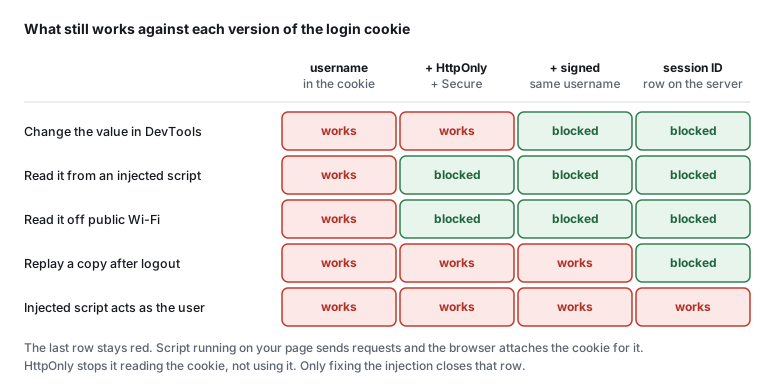
Here's where it ends up. Each column adds a layer, and each row is something an attacker can try:
A cookie is a header the browser hands back
Here's the starting point. Log in, and the server sets a cookie with the username in it. Visit your profile, and the server believes whatever that cookie says.
app.post('/login', async (req, res) => {
    const { username, password } = req.body;
    const user = await db.get('SELECT * FROM users WHERE username = ? AND password = ?', [
        username,
        password,
    ]);

    if (user) {
        res.cookie('username', username);
        res.redirect('/profile');
    } else {
        res.redirect('/login?error=Invalid login credentials.');
    }
});

app.get('/profile', async (req, res) => {
    const username = req.cookies.username;
    if (!username) return res.redirect('/login');
    const user = await db.get('SELECT * FROM users WHERE username = ?', [username]);
    // ...render the profile for user.username
});
What the browser receives:
Set-Cookie: username=maya; Path=/
A cookie is just a value the browser stores and sends back in a Cookie header on later requests. Whoever controls the browser controls that header, and you don't need DevTools to prove it:
curl -H 'Cookie: username=admin' localhost:4801/profile
# Welcome, admin
There's a second problem hiding in that header. Nothing on it says scripts can't read it, so document.cookie hands the username to any JavaScript running on the page, including JavaScript an attacker managed to inject.
One small thing before the fixes. Express doesn't parse cookies on its own, and the course pulls in cookie-parser rather than splitting the header on semicolons by hand. That's the same instinct as "don't roll your own crypto": take a maintained library that a lot of people have looked at. Do check that it is maintained, though. csurf, the CSRF middleware that used to live under the Express project, is deprecated, and plenty of tutorials still tell you to install it.
HttpOnly keeps scripts out of it
res.cookie('username', username, { httpOnly: true });
With HttpOnly set, the cookie disappears from document.cookie. It still goes out with every request, and DevTools still shows it with a tick in the HttpOnly column, but page scripts can't see it. An injected script can no longer read the cookie and post it to a server somewhere else.
Be clear about what that stops, though. An injected script still runs on your page, with your origin, so it can call fetch('/account/email', { method: 'POST', ... }) and the browser attaches the cookie for it. HttpOnly stops the cookie being stolen and replayed elsewhere. It doesn't stop the session being used from inside the page. Cross-site scripting still has to be fixed where it starts.
localStorage has no equivalent flag. Anything you put there is readable by every script on the origin, which is why a session token in localStorage is a worse default than an HttpOnly cookie.
One operational wrinkle: cookie attributes only change when the cookie is set again. Users who logged in before you added httpOnly keep the old cookie until they log in again or it expires. You don't control the browser, so plan for old cookies to stick around.
Secure keeps it off plain HTTP
Over plain HTTP the cookie crosses the network as readable text, and anyone on the same coffee shop Wi-Fi can pick it up. Secure tells the browser to send it only over HTTPS.
res.cookie('username', username, {
    httpOnly: true,
    secure: process.env.NODE_ENV === 'production',
});
The course turns it on in production only, because local development usually runs on plain http://localhost without a certificate.
Signing makes tampering detectable
Give cookie-parser a secret and ask Express to sign the cookie:
app.use(cookieParser(secret));

res.cookie('username', username, { httpOnly: true, signed: true });

// and when reading it back
const username = req.signedCookies.username;
A signed cookie carries its value plus a signature: an HMAC-SHA256 of the value, keyed with your secret, prefixed with s: and URL-encoded on the wire. When the cookie comes back, cookie-parser recomputes the signature. If someone edited the value, the signatures don't match and the cookie shows up in req.signedCookies as false. Without the secret there's no way to produce a signature that matches a new value.
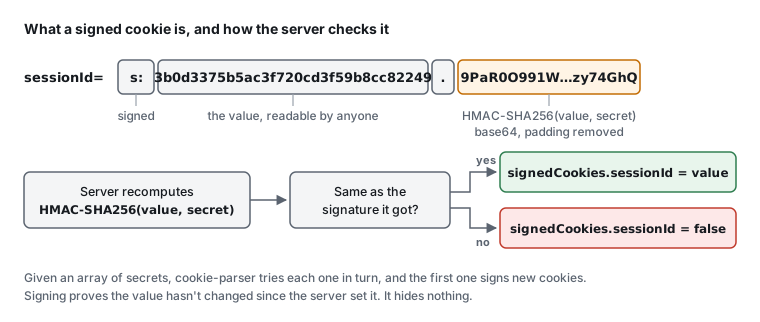
Two details are easy to miss. A plain, unsigned cookie with the same name lands in req.cookies, not req.signedCookies, so code that reads only signedCookies never sees a forged unsigned value. And signing is not encryption. The value is right there in front of the signature for anyone to read. Signing makes the cookie tamper-evident, not secret.
Keep the secret out of the repo
The course hardcodes the secret to keep the demo short, and says plainly not to do that. A secret in the code is shared with everyone who can read the repo, now or years from now, and with anyone who finds a way to read your source off the server.
Put it in an environment variable, a different one per environment. Once you run several servers, or need to rotate without a redeploy, move it into a secrets manager such as AWS Secrets Manager or SSM Parameter Store.
cookie-parser makes rotation possible. Pass it an array: the first secret signs new cookies, and every secret in the list is tried when checking one.
const secrets = [process.env.COOKIE_SECRET, process.env.COOKIE_SECRET_PREVIOUS].filter(Boolean);
if (secrets.length === 0) throw new Error('COOKIE_SECRET is not set');
app.use(cookieParser(secrets));
Put the new secret first and keep the old one second until the cookies signed with it have expired. I checked both halves: a cookie signed with the previous secret still logged in, and once the previous secret was dropped from the list, the same cookie came back as false.
The filter(Boolean) is there for a reason. If COOKIE_SECRET_PREVIOUS isn't set, the array holds undefined, and cookie-parser throws Secret string must be provided. as soon as a cookie fails the first secret. The startup check matters too. With no secret at all, Express only complains when the first res.cookie(..., { signed: true }) runs, which means the first login in production fails instead of the deploy. Generate a secret with openssl rand -base64 32.
Stop sending the identity at all
Even signed, the cookie still says who the user is. If someone steals it, they are that user for as long as the cookie lives, and there's nothing to revoke, because a username isn't a credential you can cancel.
A session puts a random ID in the cookie and keeps the mapping from ID to user on the server. The whole life of one looks like this, including the replay that logout has to defeat:
The login handler creates the row and sets the cookie:
import crypto from 'node:crypto';

const SESSION_TTL_MS = 60 * 60 * 1000;

const generateSessionId = () => crypto.randomBytes(16).toString('hex');

app.post('/login', async (req, res) => {
    const { username, password } = req.body;
    const user = await db.get('SELECT * FROM users WHERE username = ?', [username]);

    if (!user || !(await bcrypt.compare(password, user.password))) {
        return res.redirect('/login?error=invalid');
    }

    const sessionId = generateSessionId();
    await db.run('INSERT INTO sessions (id, username, expires_at) VALUES (?, ?, ?)', [
        sessionId,
        user.username,
        Date.now() + SESSION_TTL_MS,
    ]);

    res.cookie('sessionId', sessionId, {
        httpOnly: true,
        secure: process.env.NODE_ENV === 'production',
        sameSite: 'lax',
        signed: true,
        maxAge: SESSION_TTL_MS,
    });
    res.redirect('/profile');
});
Sixteen random bytes is 128 bits, which is twice the 64 bits of entropy the OWASP Session Management Cheat Sheet asks for. maxAge is in milliseconds, and Express turns it into the seconds the header wants:
Set-Cookie: sessionId=s%3A3b0d3375b5ac3f720cd3f59b8cc82249.9PaR0O991Worrq%2B9ApiiRfqZn%2F3d0tNnQIt%2Bzy74GhQ; Max-Age=3600; Path=/; Expires=Thu, 05 Nov 2026 04:17:59 GMT; HttpOnly; SameSite=Lax
The passwords here are bcrypt hashes rather than the plaintext columns the starting app compares in SQL. That's its own lesson (the repo has notes on it), but a login handler held up as good practice shouldn't be the one place plaintext survives.
The profile route now looks the session up, and treats an expired one as no session:
app.get('/profile', async (req, res) => {
    const sessionId = req.signedCookies.sessionId;
    if (!sessionId) return res.redirect('/login');

    const session = await db.get('SELECT username FROM sessions WHERE id = ? AND expires_at > ?', [
        sessionId,
        Date.now(),
    ]);
    if (!session) {
        res.clearCookie('sessionId');
        return res.redirect('/login');
    }

    res.render('profile', { username: session.username });
});
res.render matters here too. The course's profile page swaps the username into the HTML with String.replace, which is an injection point once usernames come from users. A template engine that escapes by default (EJS's <%= %>, for one) closes it.
expires_at is checked on the server because maxAge is only a request to the browser. A copied cookie doesn't expire just because the original did.
Logout deletes the row:
app.post('/logout', async (req, res) => {
    const sessionId = req.signedCookies.sessionId;
    if (sessionId) await db.run('DELETE FROM sessions WHERE id = ?', [sessionId]);
    res.clearCookie('sessionId');
    res.redirect('/login');
});
The starter app's logout only clears the cookie. That asks the browser to forget it, and does nothing about a copy someone took earlier. With the row gone, replaying the pre-logout cookie redirects to the login page, which is the behaviour you want.
With the mapping on the server, you can do things a username cookie never allowed.
- You can end one session without touching the others. That's the "where you're signed in" page most big apps have, where you sign out the device in a city you've never visited and keep your laptop.
- You can end every session for a user, or for everyone, after a breach:
DELETE FROM sessions WHERE username = ?, or empty the table. Nobody has to reset a password for that. - A session can exist before login, which is how a shopping cart survives signing in. If you do that, issue a new session ID at login and carry the cart across. Keeping the pre-login ID is session fixation: someone who planted that ID in a victim's browser is logged in alongside them.
Where to keep them depends on how many servers you run. An in-memory object works for a demo with one process. It breaks the moment you run two instances, or a serverless function that forgets everything between calls. A database table works anywhere, but you'll want a job that deletes expired rows. Redis fits well because a key can carry its own expiry. You can also issue a new ID on every request, which shortens the life of a stolen one, but it costs a write per request and fights users who have two tabs open.
SameSite decides when the cookie travels
The repo's final version adds sameSite, the attribute that matters most once the course gets to cross-site request forgery.
Noneallows the cookie on cross-site requests too, though Safari and Firefox restrict third-party cookies further. It requiresSecure.Laxsends it on top-level navigations with safe methods, so following a link from another site to yours arrives logged in. Cross-site POSTs, fetches and iframes go without it.Strictnever sends it on a request that another site started. Someone who clicks a link to your app in an email arrives logged out.
The course uses strict. I've used lax above, because it blocks the cross-site form posts CSRF depends on and still lets links into the app work. Both are better than leaving it out. Chrome treats a cookie without SameSite as Lax, but not every browser does, so set it yourself.
Same origin isn't same site
Cookies are scoped by domain and SameSite compares sites, while most other browser rules compare origins. The two get mixed up all the time.
An origin is the scheme, host and port together. Change any one and it's a different origin. A site is looser: roughly the registrable domain, so app.example.com and login.example.com are the same site. The public suffix list carves out shared hosts like github.io, so two people's GitHub Pages sites are different sites.
All of these are over HTTPS, so only the host and port change:
| Page | Request to | Same origin | Same site |
|---|---|---|---|
app.example.com |
app.example.com:8443 |
No, the port | Yes |
app.example.com |
login.example.com |
No, the host | Yes |
alice.github.io |
bob.github.io |
No | No, github.io is a suffix |
example.com |
example.org |
No | No |
The second row is the one to remember. SameSite cookies still go out on requests from a sibling subdomain, so a subdomain you don't fully control, like a marketing site on someone else's CMS or a staging box nobody patches, is inside the fence.
The same-origin policy is the browser rule that one origin's scripts can't read another origin's responses. Before CORS, people found ways round it. JSONP loaded another origin's data as a <script>, which meant running whatever that server sent back. document.domain let two pages on different subdomains both set it to their shared parent domain and become one origin. The catch was that any other page on any subdomain could opt in the same way, and browsers have been switching it off. CORS is the way round it that you're actually meant to use: the server lists who may read its responses, and the browser enforces that list. When a fetch fails with a CORS error, what you're running into is the same-origin policy, the rule that stops any page you visit from reading your bank's responses. CORS is how a server opts out of it, for the origins it names.
Two cookie attributes belong here too. Leave Domain off unless you need to share the cookie across subdomains. Without it, the cookie goes back only to the exact host that set it. With Domain=example.com, every subdomain gets it. And don't treat Path as a security boundary. It decides which URLs the cookie is sent to, but it predates the rest of the browser's security model and other pages on the same origin can still get at it.
The checklist
- Parse cookies with a maintained library, and check that it's still maintained.
- Put a random session ID in the cookie, never the username, user ID or role.
- Generate the ID with a cryptographic random source, at least 64 bits of entropy.
crypto.randomBytes(16)gives 128. - Store sessions on the server with an expiry you check on every request.
- Delete the session on logout. Clearing the cookie isn't enough.
- Issue a new session ID at login, even if the user had one before.
- Set
HttpOnly,Securein production, andSameSite=LaxorStricton the session cookie. - Sign it, read it only from
req.signedCookies, and keep the secret in the environment or a secrets manager, with a second slot for rotation. - Leave
Domainoff unless you need it. Don't rely onPath. - Remember what each layer doesn't do. HttpOnly doesn't stop XSS from acting as the user, and signing doesn't hide anything.
No single item on that list is the fix. Each one covers for a mistake somewhere else, like a template that forgets to escape or a cookie copied off a library computer. Someone on your team will make one of those mistakes eventually, probably at three in the morning during an incident, and the other layers will still be there when they do.
Check yourself
Flip through these once you've read the post. Click a card to see the answer.
Later in the course come CSRF, which is where SameSite earns its place, then XSS and Content Security Policy. The slides are public if you want the whole arc.
Enjoyed this post?
Subscribe to get notified about new posts and updates. No spam, unsubscribe anytime.
By subscribing, you agree to our Privacy Policy. You can unsubscribe at any time.
Discussion
Loading comments...
This website is still under development. If you encounter any issues, please contact me.
Found this useful? Support the blog