
- Published on
OAuth Is a Coat Check
- Authors

- Name
- Mamun Rashid
Nobody enjoys building authentication. You start with a login form and a week later you are writing password reset emails, rate limiting the reset endpoint, arguing about bcrypt cost factors and wondering why the verification email lands in spam.
Rolling your own auth is less scary than people make it sound, to be fair. Hash the password properly, keep sessions server side, and you're most of the way there. But "Sign in with Google" lets you skip a whole category of work. No passwords to store. No verification emails, because Google already verified the address. No reset flow. For a lot of early products that's the right trade, and it costs you a few clicks in a cloud console.
The clicks are easy. Understanding what you just configured took me longer, so this post is the version I wish I'd read first.
The coat check
The mental model that finally made OAuth click for me is a coat check.
You hand your coat over and get a little paper ticket. The ticket isn't the coat. On its own it's nearly worthless: a stranger who picks it up off the floor still has to walk up to the counter, and the attendant knows which counter the ticket belongs to.
In OAuth, Google is the cloakroom, the authorization code is the ticket, and your server is the only one allowed to redeem it, because only your server has the client secret.
That one idea explains most of the flow. The ticket travels through the browser, which is a place you don't fully trust. The coat itself (the tokens) never does.
What happens when someone clicks the button
This is the authorization code flow, which is what Google sign-in uses for a web app with a server.
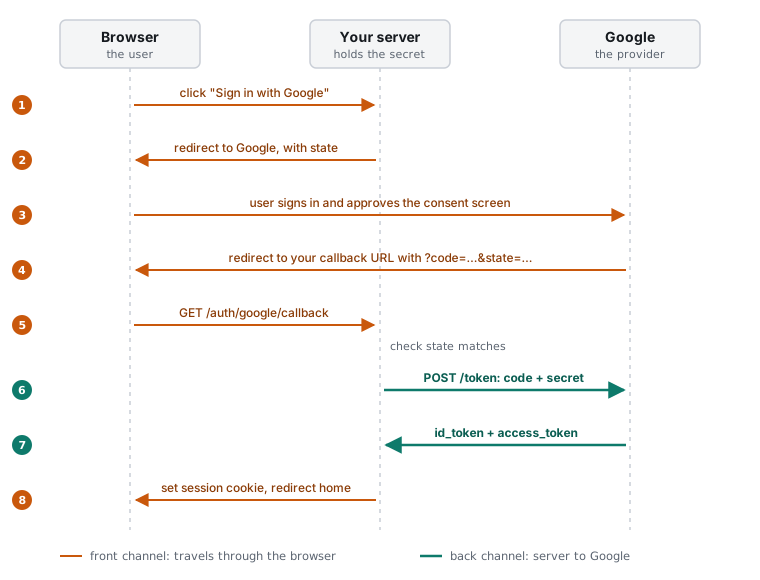
Steps 1 to 5 bounce through the browser. Your server sends the user to Google with your client ID, the scopes you want (openid email profile for plain sign-in), the redirect URI and a random state value. The user signs in and sees the consent screen. Google sends them back to your callback URL with a short-lived code and the same state.
Step 6 is the part people miss. The code that comes back in the URL isn't the user's identity yet. Your server takes it and makes its own request, straight to Google, with the client secret attached:
const res = await fetch('https://oauth2.googleapis.com/token', {
    method: 'POST',
    headers: { 'Content-Type': 'application/x-www-form-urlencoded' },
    body: new URLSearchParams({
        code,
        client_id: process.env.GOOGLE_CLIENT_ID!,
        client_secret: process.env.GOOGLE_CLIENT_SECRET!,
        redirect_uri: 'https://example.com/auth/google/callback',
        grant_type: 'authorization_code',
    }),
});
const { id_token, access_token } = await res.json();
What comes back is the coat. The id_token is a signed JWT that says who the user is: their Google account ID (sub), their email and whether it's verified. Verify it with Google's client library rather than just decoding it, so the signature, audience and expiry all get checked. Then find or create the user, start your own session, and redirect them home.
The user never sees the callback route. They click a button, see Google for a second, and land back on your site signed in. All of the interesting work happens in a request they don't know exists.
Why the redirect URI has to be registered
When you create the OAuth client, Google asks for a list of authorized redirect URIs, and it will only ever send codes to an exact match. It took me a while to appreciate why that matters.
Without it, an attacker could craft a sign-in link that says "after login, send the code to evil.example." The victim signs in with their real Google account, on the real Google page, and the ticket gets handed to the wrong person. The registered list is how Google knows which counter the ticket belongs to.
Two related habits are worth adopting from day one:
- Check
stateon the way back. It ties the callback to a sign-in your server actually started, which stops someone from forcing their own login onto a victim's browser. - Add PKCE (
code_challengeon the way out,code_verifierin the token request). It means a stolen code is useless even to someone who somehow has your client secret. Most good OAuth libraries do this for you.
http://localhost:3000/auth/google/callback is fine during development. Google allows plain HTTP for localhost, and nothing outside your machine can reach it anyway.
The consent screen is Google asking who you are
Before Google lets you create a client, it makes you fill in the consent screen: app name, support email, maybe a logo. It feels like paperwork, and it mostly is, but there's a reason. Your app is about to ask strangers to trust it with their Google account, so Google wants to know who's asking.
You'll also pick an audience. Internal limits sign-in to people in your own Google Workspace organization, and it's only available if you have one. Everyone else picks External, which is the normal choice for a public app. External apps start in testing mode, where only test users you list can sign in. Asking for just openid email profile keeps you clear of Google's scope verification review, which is required for sensitive scopes like Gmail or Drive access.
The secret you'll forget about
At the end of the setup Google shows you a client ID and a client secret, and offers a JSON download. Copy them somewhere safe, then put them in a real secret store (Parameter Store, Secrets Manager, your platform's encrypted environment settings) and never in the repo.
The secret itself isn't the dangerous part. Forgetting about it is.
Every team has a version of this story. Someone creates credentials for a quick experiment, names them test or nothing at all, and moves on. Two years later they still work, nobody remembers what uses them, and nobody wants to delete them in case something breaks. That's a door left unlocked in a building nobody walks past.
The fix is boring and it works: one OAuth client per service, and one per environment.
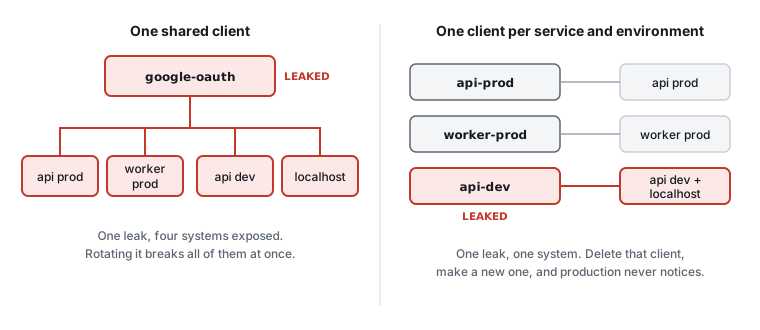
Yes, it's more credentials to manage. But when one leaks, you delete that one client and make a new one, and the blast radius is a single service. With a shared client, a leaked dev secret is a production incident, and rotating it means redeploying everything at once.
Per-environment clients also close a quieter gap. If production and development share a client, then localhost is an authorized redirect URI for production. Give each environment its own client with only its own URLs, and a dev credential can't be used to redeem tickets meant for prod.
Name them so future you can tell what they're for: billing-api-prod, billing-api-dev. The same goes for every other credential you create while getting something working. The broad admin key you made on day one "just to get unblocked" is the one that hurts later.
The short version
OAuth is a handshake. The browser carries a ticket out and back, and your server trades it for the real thing over a channel the browser never sees. The redirect URI is how the provider knows where the ticket may go, state and PKCE stop it being hijacked on the way, and the client secret is what makes your server the only one allowed to redeem it.
None of that is much code. The part that takes discipline is the credential hygiene around it: one client per service and environment, sensible names, secrets in a secret store, and deleting what you no longer use.
Enjoyed this post?
Subscribe to get notified about new posts and updates. No spam, unsubscribe anytime.
By subscribing, you agree to our Privacy Policy. You can unsubscribe at any time.
Discussion (0)
This website is still under development. If you encounter any issues, please contact me